A mobile based application that allows users to send, receive, budget, and save money while managing all their accounts in one place.
The world of buying and selling has changed—more and more transactions happen online without the need for a physical credit or debit card. The amount of online sales and transactions has been steadily increasing, consumers are subscribing to a multitude of online services, and high street stores are closing in large numbers.
There are many factors that make online purchases favorable, from cost and convenience, to security, to name a few. This ecommerce trend has been catalyzed by the global coronavirus pandemic in 2020, forcing many people to stay inside, wary of going to the store and of using their physical cards to pay for items.
With it, this trend has brought forward the problem of how to make purchases securely and efficiently. How can your banking and card details be stored in one place? How can this same tool be used to make transactions or transfers in online stores and overseas? What’s important to users when buying online?
Overview
Info
Role
UX Designer
Timeline
March 2021- October 2021
Note* This is a conceptual mobile app, Stacks is not a real company.
Problem
Build an application to allow anyone to shop, transfer money, and more without a debit or credit card or the need to visit a physical bank or store.
Outcome
Stacks is an all-in-one mobile payment services application that allows users to transfer and receive money digitally, view spending history, pay bills, save and budget, and to keep track of multiple bank accounts.
Getting Started
Problem Statements
I started the project by doing some marketing research and developing possible problems and solutions to begin to understanding what my users may be experiencing and to give me a starting place to continue my research.
List of possible Problems:
Lack of security
Lack of saving options
Required checking account
Lack of options all in one place
Required debit card
Lack of rewards programs
Lack of education in the financial decisions
Lack of ease and convenience
Problem Statement:
Our users need a way to securely shop, easily send and receive money, and more without a traditional debit card, or the need to visit a physical bank or store because the traditional options are time-consuming, lack security, and don’t offer an all-in-one option for ease and convenience.
We will know this to be true when we see our users easily sending and receiving money and making purchases without a traditional debit card or the need to visit a physical bank or store.
Description of possible solutions:
Savings education and plan options
Virtual debit card to allow purchases without a checking account or
physical debit card.
Check scanner to deposit money without a checking account
SSL certification and optional 2-factor sign in and purchases
Reward programs
Research and Understanding
Competitive Analysis
To gather more insight into the financial tech industry and who my competitors are, I conducted a competitive analysis. I analyzed two direct competitors in the financial services industry to better understand what’s working and what isn’t working and to identify any gaps that Stacks might be able to address. My analysis of these competitors included: Overview, Key Objectives, Overall Strategy, Market Advantage and SWOT analysis. Here is a synapsis of my analysis:
Evaluation Research
User Surveys and Interviews
The market research and analysis from the current audience as well as the problem statements, gave me a great starting point to dig deeper into understanding my target users and how they manage their personal finances.
I began by conducting three users interviews with a script and 16 base questions. These questions allowed me to ask follow-up questions that addressed their needs, wants, and pain-points.
Research Analysis
Affinity Mapping
To condense and understand the information that I gathered from the interviews, I created several affinity maps to identify trends, insights, behaviors, and themes.
Insights:
Functionality:
Apps need to respond and work the way they are meant to, or it’s very frustrating for users.
Clear navigation and content are important to users.
Users want to easily do the job they are wanting to accomplish.
Clean designs are important to users.
Intimidation:
Users want uncomplicated designs so they are not intimidated.
“Friendly” designs and layouts are important to users – clear information, clear layout
If apps seem to complicated, users won’t use them.
Purchase Types:
Most individuals use money sending apps for other individuals, which banks use for big companies
– the need for an all-in-one will be bridged here.
Social:
Users need apps to be able to connect to their contacts for added convenience and perceived security
when sending money.
Social aspects make apps feel more “friendly” to users.
The social side is important to users but needs to be controlled, maybe limited to just friends.
Social components are so important, but group transactions are currently difficult.
Banking and Cash:
People are ready to make new decisions about their money, there just aren’t all-in-one options
Having the option to get cash seems important but would be rarely used – cash back on ATM fees may solve the problem
People choose to use traditional banking because of perceived convenience that our outdated.
No traditional banking allows you to easily send money to individuals like Venmo, Cashapp, or Zelle.
People continue to use traditional banking, but for no real reason. It’s just a way to “store money”
Cash its frustrating enough that people try to avoid it completely.
Convenience is key.
Banking apps have incorporated functions to decrease the need of ATMs.
Jobs To Be Done:
Users check their purchases very regularly to help keep them on track.
the use of budgeting apps goes beyond just budgeting because of the poor design of other apps.
users are doing many savings on their own, because of lack of personalization.
Security:
Security is very important to users.
While security is important, it is also important to have ease of logging in.
Users don’t trust apps that don’t seem to have proper security features, but will still use them if they offer enough convenience.
Understanding the User
User Personas
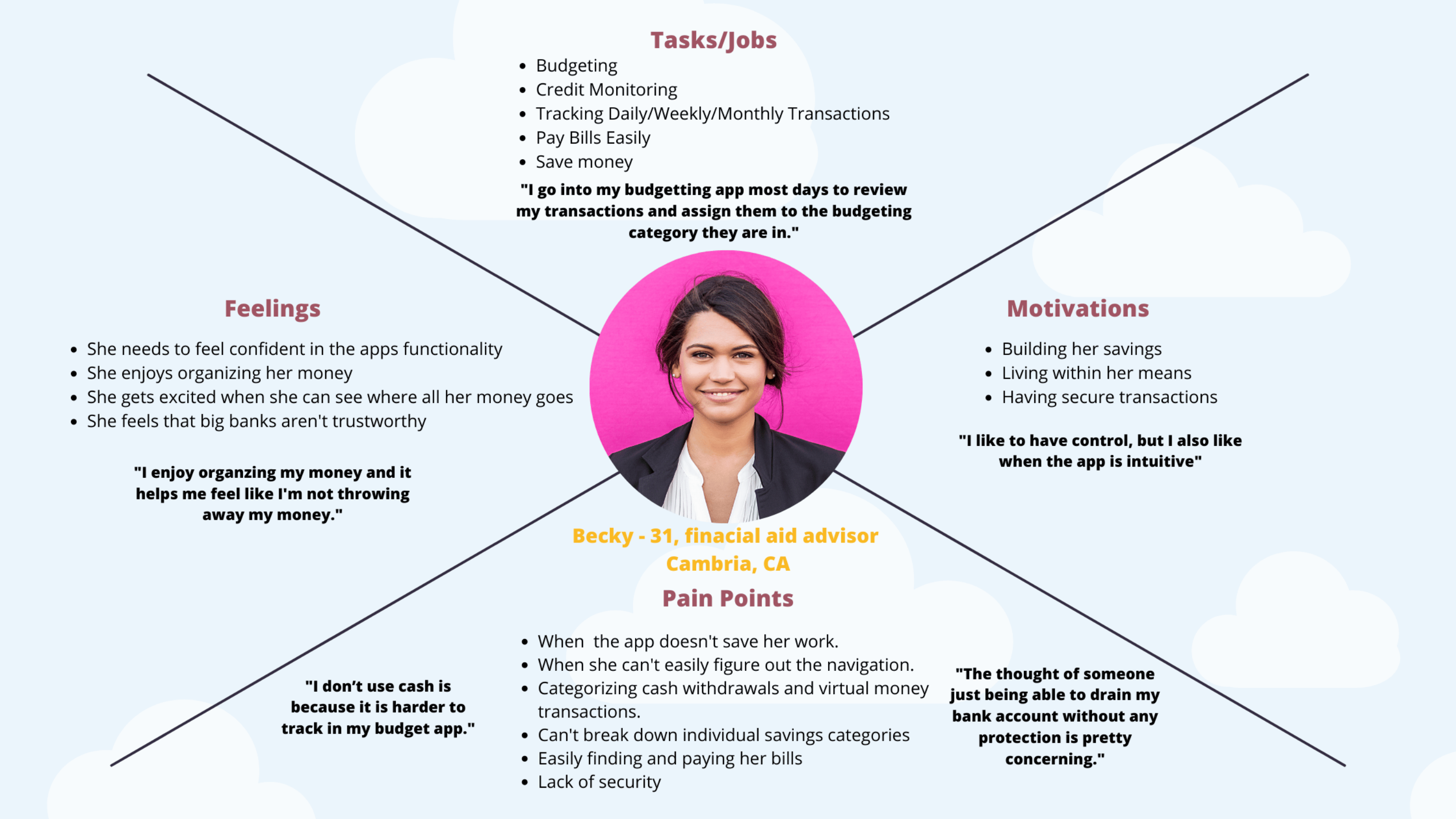
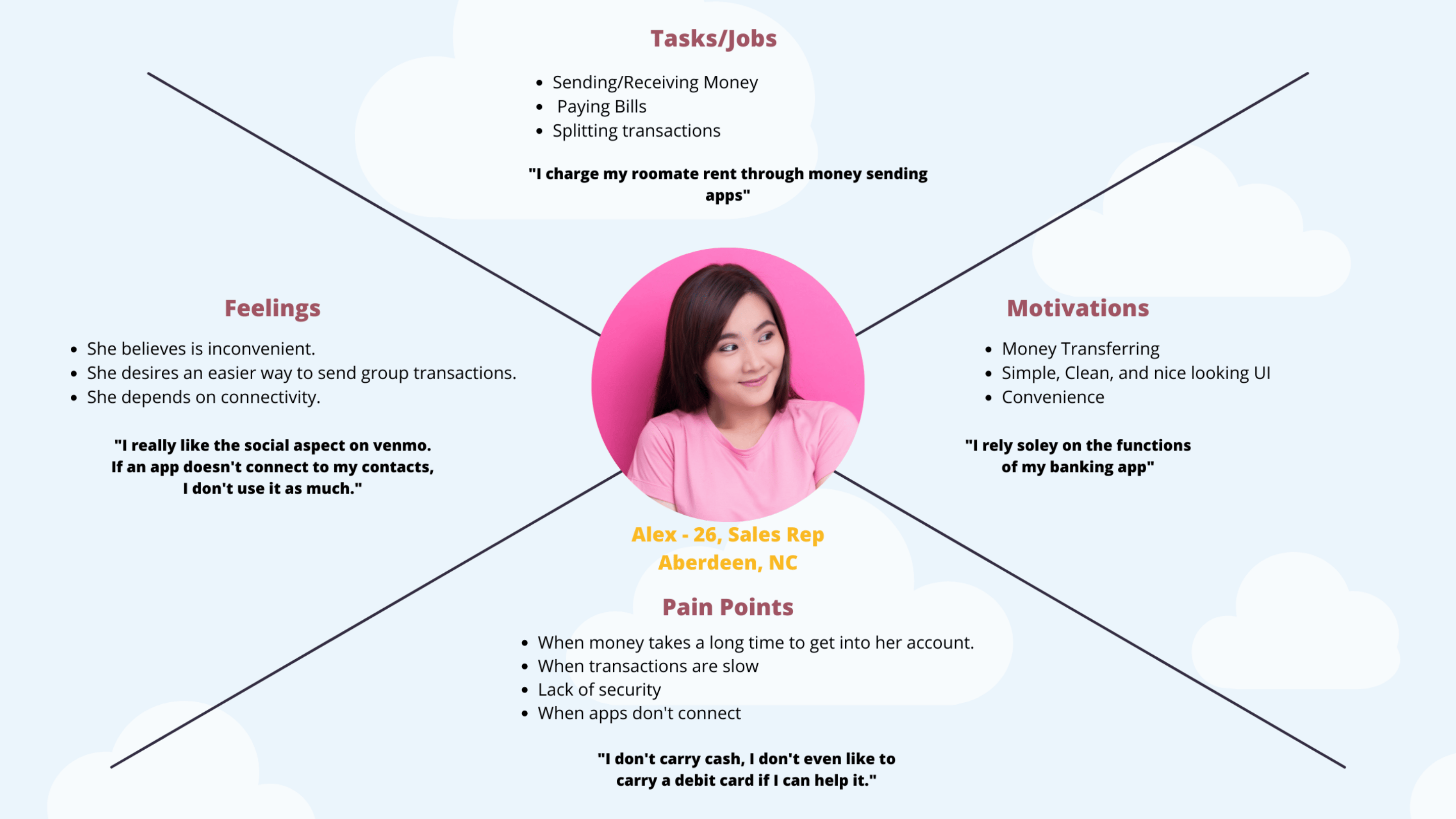
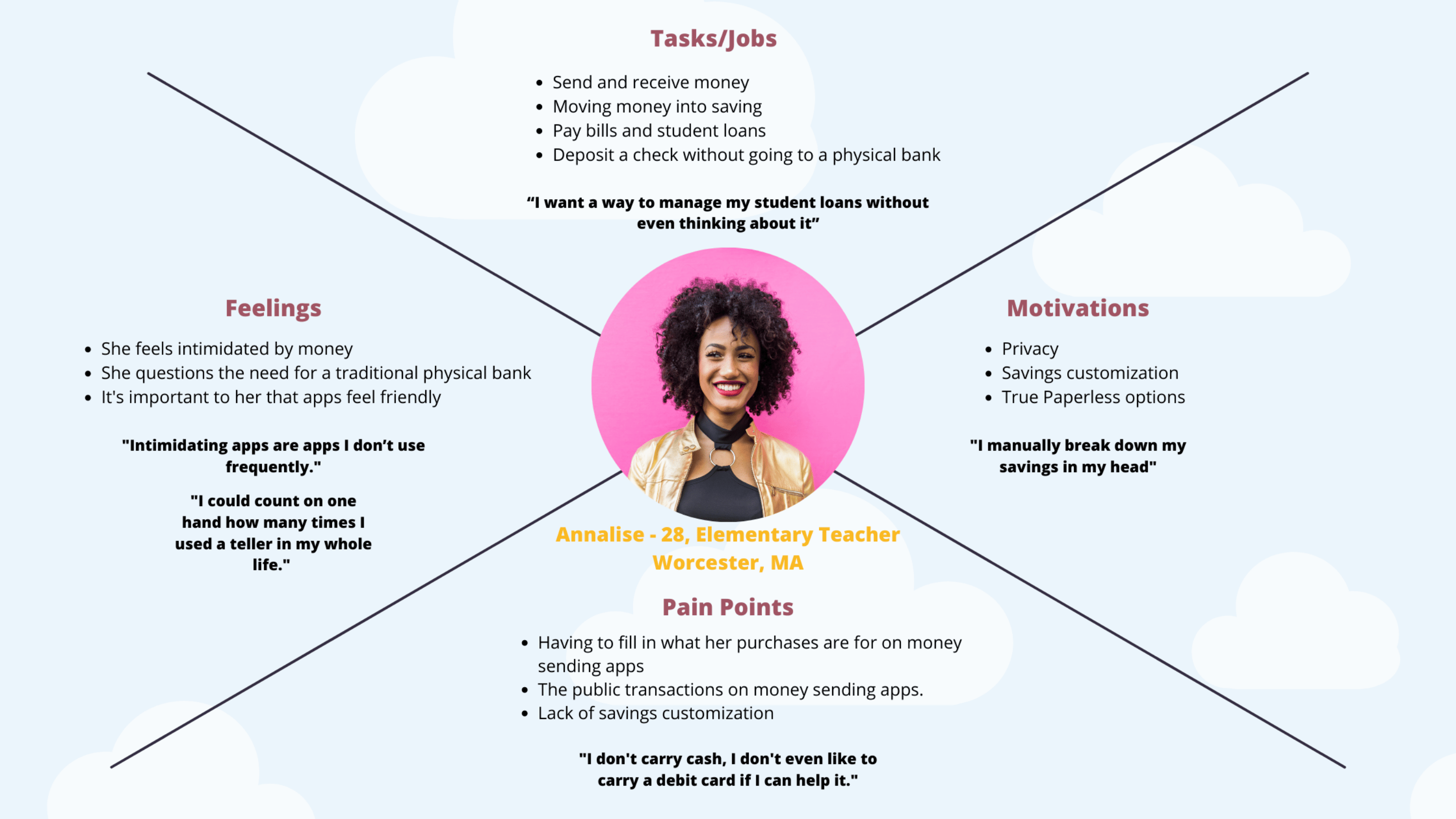
My analysis of the user interviews showed me three specific jobs that my users would be focusing on, Saving, Budgeting, and Sending and Receiving money. I decided to created three separate personas to represent each one of these features. The personas focused on Tasks/Jobs, Feelings, Motivations and Pain Points.
Mental Models
User Journey
To continue to empathize with my users personas, I created a User Journey to get a visual understanding of what a typical day might look like for my persona to accomplish a goal. Below is Becky’s user journey where she is focusing on budgeting allocate funds so her and her husband can work on house projects together.
Task Analysis
User Flow
At this point I wanted to take a step back to concentrate on user flows rather than individual pages, to make sure the design was user-centered, which would make the app more successful in the eyes of my users.
I also wanted to make sure I had completely discovered what pages and screens were needed before I entered the information architect phase of this project.
Ideate
Card Sorting
By walking through the user flows from my personas’ points of view, I was able to ensure that my personas’ every need had been satisfied at every point in the user flow. That way, no matter what a persona may need, there will be a screen or page to accommodate them.
From here, I was able to begin generating potential solutions. I began to lay out the framework of the app by creating a site map and then I conducted a digital open card sorting test. Participants were asked to first review a list of cards and then sort them into groups that made sense to the them. Once the participants created different groups they were then tasked to create a title for each group.
To analyze the results from the open card sort exercise, I used the tool Optimalworkshop similarity matrix to identify strong card pairings and potential groupings.
After the card sorting, the biggest thing I learned was that a lot of my terms didn’t seem to be clear enough – making me wonder if name changes may help clarify the information – for example, I used “accounts” and “Edit accounts” which is similar to what people think of their profile, but in reality I meant banking accounts. There were a lot of random groups in the similarity matrix, which was concerning to me. It is incredibly important, especially with a financial app, that the information be clear, which is exactly what I addressed in my second site map.
Wireframes
Low Fidelity Paper Sketches
With a sitemap in place I then began to design the main screens that I identified in my user flow by sketching low-fidelity wireframes. My goal during this phase was to sketch a couple of different solutions based on the research that I had gathered up to this point. Using pen and paper this allowed me to quickly create and modify different layouts as well as paper prototype.
Below you can see paper sketches:
Wireframes
Mid Fidelity and Prototype Links
Once I had an idea of what possible solutions were needed and what was going to go on the pages, I started working on mid fidelity wireframes.
Wireframes using Balsamic
Mid Fidelity Figma Prototype
Once I bad a better idea of the page layouts I created a clickable mid fidelity prototype in figma and started to add UI elements to each screen for usability testing to get user feedback on the user flows.
Testing
User Testing and Protype
After creating a mid-fidelity clickable prototype, it was time to test my product! But, before I started testing my prototype, I created a usability test plan which includes my objectives and test script, to use as a metric to see how users interact with the app and to define what objectives and goals I wanted to achieve by conducting a usability test.